How Applinth integrates with your SaaS
Applinth is a whitelabel integration marketplace that runs next to your SaaS. Users arrive identified via a signed JWT, with no second login and no rebuild on your side.
What Applinth is #
Applinth is a whitelabel marketplace of pre-built integrations your customers can switch on for their own account in your SaaS. It feels like a section of your product, but it runs as its own application alongside your stack.
The promise to a CTO evaluating Applinth is simple: your SaaS does not change. You add one link from your product to Applinth and one short routine that signs a token. Everything else, the marketplace UI, the per-tenant configuration, the actual integration runtime, lives in Applinth and is operated for you on Orchesty.
Your SaaS does not change #
The most common worry is that Applinth means a refactor. It does not. Concretely, the only changes on your side are:
- One link in your UI that opens Applinth in a new tab or via a redirect.
- One backend routine that mints a short-lived signed JWT for the current user.
- No data model changes, no schema migrations, no auth refactor, no new MongoDB or RabbitMQ in your stack.
Applinth does not read or write your product database. It does not store your users' passwords. It does not need a new SSO setup. It piggybacks on the session your user already has in your SaaS.
Identity passthrough via JWT #
Applinth has no login screen. Users arrive already identified, every time. The mechanism is a short-lived signed JWT that your backend mints right before the redirect.
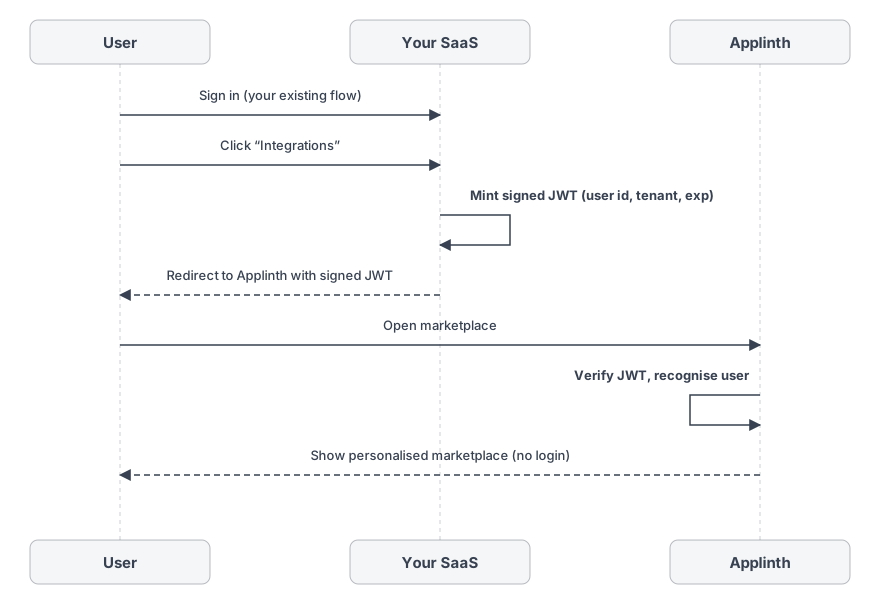
The token carries an anonymised user identifier, optionally a tenant id and a role, and a short expiry. Applinth verifies it on every entry, recognises the user, and shows their personalised marketplace state: which integrations they already have running, what is configured, what is available to enable.
A few practical notes:
- The JWT is short-lived, typically minutes. Re-entry to Applinth always goes back through your SaaS.
- The shared secret or signing key is exchanged once during onboarding. Your team controls when to rotate it.
- The identifier you put in the token is opaque to Applinth. You decide what it means and how it maps back in your system.
Whitelabel branding #
Applinth is whitelabel. Colors, logo, copy, and domain are configured to match your product. To your users, the marketplace looks and feels like a section of your SaaS, not a third-party tool.
This matters for two reasons. The CTO does not have to explain "another tool" to customers. And users do not have to learn a new UI: they recognise your branding, your tone, and the integrations you have curated for them.
What runs where #
A clean separation:
- Your SaaS keeps its own users, sessions, data, and product flows. Nothing moves out.
- Applinth runs the marketplace UI, the per-user integration configuration, and the integrations themselves.
- Orchesty powers the execution underneath: workers, asynchronous channels, monitoring, and retries.
Your SaaS only knows about Applinth as "the URL we redirect users to with a signed JWT". Applinth only knows about your SaaS through the identifier in that JWT. The two systems stay decoupled.
Rollout #
A typical rollout is days, not months:
- Agree branding: colors, logo, domain, copy.
- Add the redirect link in your SaaS UI.
- Implement JWT signing on your backend with the shared key.
- Verify end-to-end with a single internal tenant.
- Open it up tenant by tenant, then to all users.
Most of the work is on the Orchesty side: curating the integration catalogue for your domain, configuring the marketplace, and running the integrations once they are switched on. Your engineering team's contribution stays in the redirect-and-JWT scope.
When Applinth fits #
Applinth is a fit when:
- You run a multi-tenant SaaS where each customer needs their own connections to third-party systems.
- The same integration requests come back from different customers, and one-off implementations are starting to add up.
- You want to offer integrations under your own brand, on your own roadmap, without building an integration team in-house.
It is not the right tool if you only need a handful of static integrations baked into your product, or if your customers do not need any third-party connections at all.
Next steps #
- Talk to Sales to scope a rollout for your SaaS.
- See the Enterprise package for the SLA, deployment, and support context Applinth ships in.