Orchesty Admin
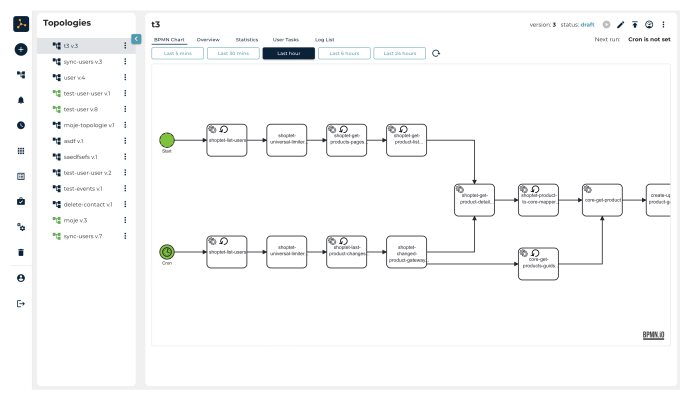
Orchesty Admin is a web-based user interface for managing your integration platform. It provides tools for:
- Modeling processes - Design integration workflows using a graphical editor
- Managing topologies - Configure and monitor your process topologies
- User management - Control access and permissions
- Application authorization - Set up authentication for integrated services
- Process monitoring - Track execution, view logs, and handle errors
- Diagnostics - Analyze performance and troubleshoot issues
Accessing Orchesty Admin #
After installation, Orchesty Admin is available at: http://127.0.0.10
For first-time login, use the default credentials created during installation:
- Email:
test@orchesty.io - Password:
password
Important: Change these credentials immediately in production environments!
Key Features #
| Feature | Description | Capabilities |
|---|---|---|
| Process Topology Editor | Graphical editor for building integration workflows | Drag and drop nodes, connect services and define data flow, configure node behavior and settings, test and debug processes in real-time |
| Marketplace | Browse and install pre-built connectors from Orchesty Store | Ready-to-use applications and connectors, one-click installation, version management |
| Monitoring & Diagnostics | Keep track of your integrations | Real-time process execution monitoring, detailed logs and error tracking, performance metrics and statistics, message queue visualization |
| Application Management | Configure authentication for integrated services | OAuth 2.0 setup, API key management, credential storage, test connections |
Managing Users #
Admin users are managed using the console commands. All user management operations require access to the server where Orchesty is installed.
CLI Commands #
| Command | Description | Required Input |
|---|---|---|
bin/orchesty user:create | Create a new user | Email address, password, confirmation |
bin/orchesty user:list | Display all existing users | None |
bin/orchesty user:password:change | Reset a user's password | User email, new password, confirmation |
bin/orchesty user:delete | Remove a user from the system | User email, confirmation |
The email address will be used as the username for login.
Warning: Deleting a user is permanent and cannot be undone. Make sure you want to remove the user before confirming.
User Roles & Permissions #
Currently, Orchesty Admin operates with full administrative access for all users. Role-based access control (RBAC) may be available in future versions.
Next Steps #
Now that you understand Orchesty Admin, explore these topics:
- Create your first topology - Follow tutorials to build integration workflows
- Set up applications - Configure authentication for services
- Install connectors - Add pre-built integrations
- Monitor processes - Track and troubleshoot workflows
- Use the graphical editor to visualize your integration logic
- Start with simple workflows and gradually add complexity
- Test processes with sample data before production deployment
- Monitor logs regularly to catch issues early