Bidirectional CRM and ERP Synchronization Without Duplicates
How Orchesty keeps a CRM and an ERP in sync in both directions without creating duplicate contacts, using an explicit ID mapping table and inverse-id custom fields as a defence-in-depth pattern.
A CRM and an ERP rarely speak the same language about the same person. The CRM thinks of a contact 123 with a sales pipeline attached. The ERP thinks of customer WHS-9981 with a billing address, an open invoice, and a credit limit. Sales updates a phone number in the CRM; finance updates a billing email in the ERP; both edits need to land on the other side without creating a second copy of the same person.
Most teams discover the same problem in the same way: they ship a one-way sync ("CRM creates customers in the ERP"), it works for a quarter, and then the first ERP-side edit produces a duplicate contact in the CRM the next morning. This use case shows the topology that prevents that — anchored in the ID mapping pattern — and the operational habits that keep it healthy at scale.
The shape of the integration #
Two flows, one shared table, no shared identity assumed:
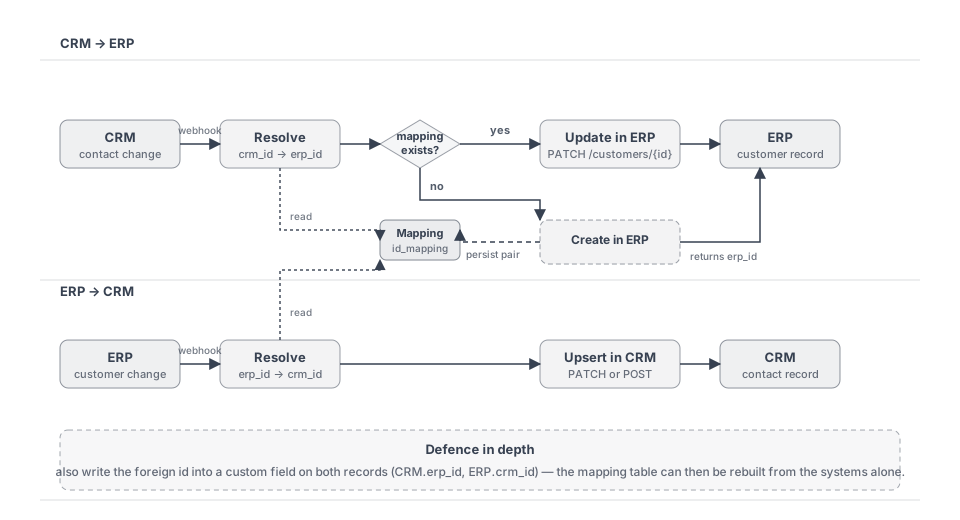
- CRM → ERP is the high-volume direction. Most contact creation happens in the CRM, where sales pipelines live; the ERP catches up.
- ERP → CRM is the corrective direction. Finance edits — billing email, VAT id, dunning state — must propagate back so sales is not staring at outdated data.
- The mapping table sits between them. A small
id_mappingtable (or collection) in your own database, with a unique constraint on the natural lookup key. It is read by both flows and written only by the create paths.
CRM → ERP flow in detail #
Each CRM-originating message goes through three nodes:
- Resolve. A custom node takes the CRM contact id, queries the mapping table for
(source_system='hubspot', source_id, target_system='erp'), and either enriches the message with the resolvederp_idor branches into the create path. - Update or Create. If the mapping exists, the message goes straight to a
PATCH /customers/{erp_id}in the ERP. If not, it goes to aPOST /customersand the response carries the freshly assignederp_id. - Persist. Immediately after a successful create, a custom node writes the new pair
(crm_id, erp_id)into the mapping table. Persist before any downstream consumer reads. If you ever process two events for the same brand-new contact in close succession, the second one must see the mapping when it asks; otherwise you trigger a second create and produce the duplicate this whole pattern exists to prevent.
The reverse direction is symmetric: an ERP webhook hits a resolve node that asks (source_system='erp', source_id, target_system='hubspot'), and either updates or creates in the CRM. Same mapping table, opposite columns.
Defence in depth: the inverse id in custom fields #
The id_mapping table is the source of truth, but it is also a single point of failure. If it gets lost — corrupted backup, accidental truncate, ransomware on the integration database — there is no clean way to rebuild it from the CRM and the ERP alone unless you also kept a copy of the mapping somewhere they can see. Hence the defence-in-depth habit:
- Write the ERP customer id into a
erp_idcustom field on the CRM contact. - Write the CRM contact id into a
crm_idcustom field on the ERP customer.
Both happen in the same custom node that persists into the mapping table — one extra API call per direction. From that point on:
- If the mapping table is lost, you can rebuild it by walking the entities on either side and reading the inverse id from each record.
- A support engineer looking at a HubSpot contact can immediately see the matching ERP customer id without opening the integration database.
- Teams that don't have access to the integration DB can still trace a problem across systems on their own.
If a system has no extension fields available, do it where you can — the systems that allow it are usually the ones where outages tend to be most painful.
Why a mapping table over fuzzy email matching
"Just match contacts by email" feels simpler until the first real edge case: an employee changes their email and now the integration thinks they are a new person. A customer signs up twice with two slightly different addresses (john@example.com and j.smith@example.com). A B2B buyer shares one email across three colleagues. A cleaning script normalizes case in the CRM but not in the ERP.
A mapping table makes identity an explicit decision made once, at create time, instead of a guess made on every sync. The cost is one small custom node per direction. The payoff is that a renamed contact, a typo fixed in either system, or a merged duplicate stays the same row in your mapping table — the mapping is between records, not between values.
Operational notes #
- Race conditions on create. Two parallel webhook events for the same brand-new contact (a quick double-edit in the CRM, or two devices syncing at the same time) can both reach the create path before either persists. Put a unique constraint on
(source_system, source_id, target_system)and treat duplicate-key errors as "already mapped, fine, move on" — re-resolve and continue with the existingerp_id. This single line of defensive code prevents an entire class of duplicate-record incidents. - Loop prevention. Both systems fire webhooks on writes, including writes you just did via the integration. Tag every outbound write with a marker the receiving webhook can recognize (a header, a custom field, an audit comment) and short-circuit at the start of the resolve node when you see your own change coming back. Without this you create an infinite ping-pong on every edit.
- Backfill before flipping the switch. When you connect the integration on an existing CRM and ERP that have lived in parallel for years, run a one-off topology that reads existing entities from both sides, matches them on a business key (email, VAT id, customer code), and writes the initial mapping rows. Plan this run before the regular sync starts; otherwise every existing customer on both sides will look "new" to the resolve node and you will create thousands of duplicates in minutes.
- Soft deletes. Don't delete mapping rows when the source contact is removed in either system. Mark them inactive and keep the timestamps. A mapping that disappears makes "why did the same customer get created twice last week" impossible to answer.
- Auditability. Mapping rows are forensic gold during incident triage. Keep
created_at,created_by_topology, andlast_seen_atcolumns from day one. They cost nothing to add and save hours when something looks wrong in a synced record. - Rate limits. Both CRMs and ERPs throttle aggressively, and a backfill or a mass-edit on either side will swamp the integration. Configure per-application rate limits in Orchesty so a sales import does not knock the ERP over and vice versa — see the operational visibility guide for the Limiter view that shows you exactly when this kicks in.
Summary of results #
- Zero duplicates even under bidirectional, concurrent edits — the mapping table makes identity explicit instead of guessed.
- Survivable storage — the same mapping is written into custom fields on both records, so a lost mapping table can be rebuilt by walking the systems alone.
- Operator-friendly — a contact in either system carries the foreign id visibly, so support engineers don't need DB access to trace a problem.
- Race-safe — a unique constraint on the mapping turns the worst-case concurrent-create scenario into a no-op instead of a duplicate.
Related #
- ID mapping guide — the underlying pattern in depth, including pairwise vs canonical-id shapes and the same defence-in-depth recommendation.
- Self-correcting integrations guide — what to do when a referenced entity (e.g. a company on a contact) is missing in the target system instead of failing the message.
- Operational visibility — Trash workflow, Limiter view, and dashboards behind the rate-limit mention above.
- Eshop synchronization use case — the same mapping pattern in a different domain (e-shop ↔ ERP customer round-trip).