Topologies
A topology is the runnable unit of Orchesty: a directed graph where nodes do work and queues carry messages between them. You design topologies in the visual editor, version them like code, publish them, and let the platform execute one process per incoming message.
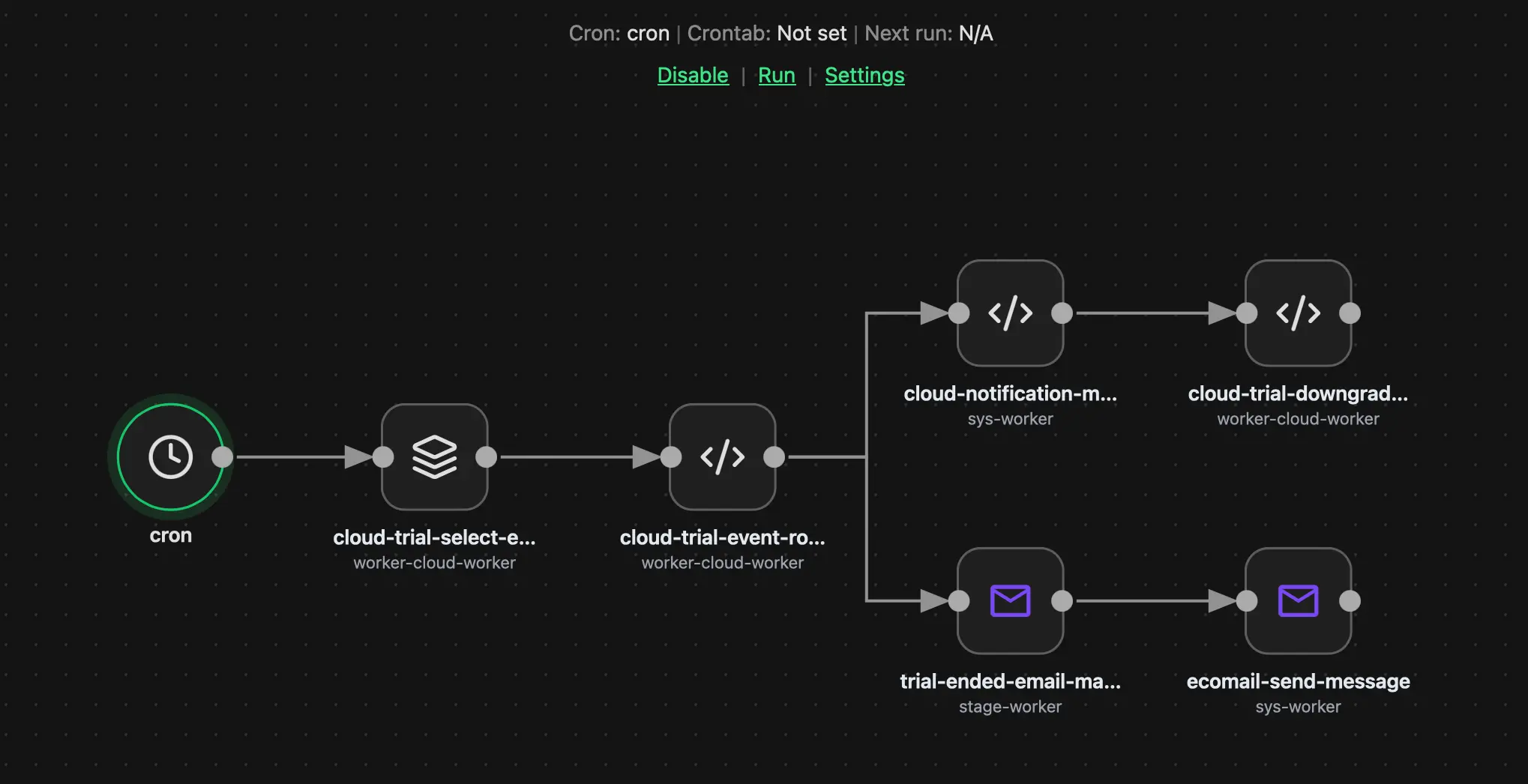
For the narrative-style introduction (with examples and visuals), see the Learn article Topologies — The Anatomy of a Data Pipeline. This page is the developer-oriented reference.
Nodes #
A node is a unit of execution that handles one message at a time. Per-node configuration covers concurrency (parallel vs strictly sequential), retry behaviour, and rate limiting against any external service the node calls.
The platform groups nodes by purpose:
- Events — entry points that inject data into the topology: Start (manual / API), Cron (scheduled), Webhook (reactive). For the canvas mechanics, URL contracts, and the Subscribe / Unsubscribe lifecycle, see Building nodes: Event nodes.
- Actions — processing units: Connector (calls an external API directly; typically backed by an Application that supplies shared authentication and user-facing settings, but the call itself is the connector's), Batch (paginates a large dataset and emits one message per page or item), Custom Node (any logic, transformation, mapper, or routing decision).
- Built-ins — Breakpoint (pause a process at a chosen point so you can inspect the in-flight payload) and Annotation (visual note on the canvas, no runtime effect).
Each node has a name it registers under; names are unique per worker. The class you extend depends on the SDK you use — the Reference overview lists the equivalent base class per language for Custom Node, Connector, and Batch.
Queues #
A queue lives between two connected nodes. The platform owns the queues; nodes never read or write them directly. The queue's job:
- Decouples producer from consumer (the producer node returns, the consumer picks up at its own pace).
- Persists every message until the consumer acknowledges it.
- Allows several worker replicas to consume in parallel, subject to the consumer node's concurrency setting.
Backpressure is built in: a slow consumer's queue grows; depth is visible in the dashboards.
Routing #
Routing is defined by the edges you draw on the canvas. By default, when a node finishes, the Bridge sends the resulting message to every directly connected downstream node — if two branches lead out of a node, both branches get the message. No code is needed for this; it's the implicit behaviour of any wiring.
A node can optionally attach routing rules in its response to override that default and select which branches the Bridge should follow:
- Default — fan-out. No rule in the node = the message goes down every outgoing edge. This is what most Custom Nodes and Connectors do.
- Conditional flow. A Custom Node acting as a Router inspects the payload and returns a rule that names the subset of branches the Bridge should use (e.g. Approval vs Auto-process based on
price > 1000). The rule can pick one branch, several branches, or none at all. - Stop. A node can mark a message as terminal (see "Logged filtering" below); the Bridge stops processing without raising an error.
The model stays explicit on the canvas — every reachable destination is a line you drew — but the runtime decision about which of those destinations actually receive the message can be refined per-message by the node that produced it.
Logged filtering #
Filtering means intentionally discarding a message that doesn't meet your criteria. Orchesty insists on this being explicit and observable rather than a silent return. Nodes signal intent via a result code:
| ResultCode | Meaning | Process state |
|---|---|---|
DO_NOT_CONTINUE | Discard this message intentionally (filtered). | Success — clean exit, recorded on the process. |
STOP_AND_FAILED | Something went wrong; stop and move the message to Trash. | Error — needs attention. |
Both outcomes are recorded against the process so you keep observability either way. Each SDK exposes the same set of result codes — see the Reference overview for the per-language symbol.
Resilience and the Trash #
If a node fails — whether through a thrown exception, a STOP_AND_FAILED return, or an unexpected worker crash — the message is not lost. The platform moves it to Trash, a persistent failed-message inbox where you can:
- Inspect the exact payload and error at the moment of failure.
- Restore the message back into the process at the point where it failed.
- Drop it once you've decided it's no longer relevant.
Worker resilience is part of the model: because each node runs in an external worker process, even a total worker crash doesn't kill the topology. The orchestration layer retries; if the worker stays unreachable, messages are diverted to Trash for manual recovery. See Processes and Messages for the lifecycle details.
The Bridge #
When you publish a topology, the platform spins up a dedicated control microservice for it called the Bridge. The Bridge owns the routing for that topology and ensures operational isolation between topologies — if one is overloaded, the others keep running unaffected. You don't deploy or manage the Bridge yourself; it's part of the platform's response to a publish.
Lifecycle and versioning #
Topologies move through a few well-defined states:
- Draft — editable in the canvas, no Bridge yet, no traffic.
- Published — the platform has provisioned the Bridge and queues. The topology can be enabled.
- Enabled / Disabled — toggles whether new incoming messages are routed to this version.
- Unpublished — Bridge and queues are torn down (manual, destructive, see below).
Editing a published topology produces a new version; the previous version keeps running in parallel. When you enable the new version:
- All new incoming messages and event triggers (Cron, Webhook) are routed to the new version immediately.
- The old version's Bridge keeps running so any in-flight messages already in its queues can finish their journey undisturbed.
The previous version is not killed automatically. To retire it, you Unpublish it — a manual, confirmed action that tears down its Bridge, drops its queues, and clears any messages remaining in the rate limiters or Trash for that version. Because Unpublish is destructive, the UI requires explicit confirmation.
Process vs message #
Every entry into a topology (a webhook, a Cron tick, a sync API call, a manual Start) creates a process: a tracked execution of one initial message through the graph. As that message travels, every node visit is recorded against the process so you can replay history end to end.
If a node fans out (e.g. a Batch emits 500 child messages), the children are part of the same process. The platform records every traversal — successful or failed — against the process and surfaces it in the topology / process detail in the Admin UI.
See Processes and Messages for persistence guarantees and the message lifecycle.
See also #
- Learn — Topologies — The Anatomy of a Data Pipeline: narrative introduction with examples.
- Workers and SDK — what runs the nodes.
- Connectors and Applications — how nodes talk to third-party services.
- Processes and Messages — what happens between two nodes.
- Batch — the connector that paginates a source into the stream.
- Development: Building nodes — how to actually write each node type.
- Reference overview — concept-to-class index across all SDKs (including the result-code symbol per language).