Topologies: The Anatomy of a Data Pipeline
How Orchesty topologies work as active data pipelines: node types, routing, error handling, versioning, and lifecycle.
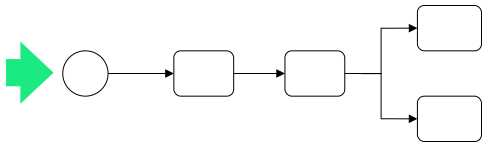
In Orchesty, we don't just "write scripts". We design Topologies. A topology is the strategic blueprint of your data journey. It is a live pipeline connecting various actions where logical routing, data transformation, filtering, and API communication happen in a controlled, asynchronous environment.
1. The Building Block: The Node #
Every single action within a topology is called a Node. A node is a specialized worker unit that performs one task. However, a node in Orchesty is much more than a simple function call:
- Concurrency Control: For every node, you can configure whether it processes messages in parallel (for maximum speed) or strictly sequentially (if the order of messages is critical).
- Reliability Settings: For nodes communicating with external services, you define Rate Limits, the number of Retries, and the intervals between them if the remote service is temporarily unavailable.
2. Core Components: Events & Actions #
Components are the "functional organs" of your topology. They are generally divided into two categories:
Events (The "When") #
These are the entry points that inject data into the pipeline:
- Start Event: A manual or API-triggered entry point.
- Cron Event: A scheduled trigger (e.g., "every Monday at 8:00 AM").
- Webhook: A reactive listener that waits for external "push" notifications.
Actions (The "What") #
These are the processing units:
- Connector: Communicates with external APIs (GET, POST, etc.).
- Batch: Specialized for paginating through large datasets.
- Custom Action: Any specific logic, transformation, or calculation defined by the developer.
3. Intelligence: Routing & Filtering #
A topology isn't just a straight line; it's a decision-making engine.
Logical Routing #
Every node can define routing conditions on its output. This allows you to build complex Routers using Custom Actions.
- Default Behavior: If no specific routing is defined, the node automatically broadcasts (fan-out) the message to all subsequent connected nodes.
- Conditional Flow: You can direct data to different branches based on its content (e.g., "If Price > 1000, go to Approval Node").
Controlled Filtering #
Filtering is the act of intentionally discarding messages that do not meet certain criteria. In Orchesty, we emphasize Logged Filtering. If you discard a message "silently" in code, you lose observability.
The platform distinguishes between two outcomes when a node stops a message:
- Intentional discard. The node decides this message does not meet the criteria and should not continue. The process ends as a clean, recorded success.
- Error stop. Something went wrong; the message stops and is moved to the failed-message inbox for inspection. The process ends as an error that needs attention.
Both outcomes are recorded against the process so you keep observability either way. For per-language details on how to signal each outcome, see the Topologies reference in the documentation.
4. Resilience: Error Handling & The Failed-message Inbox #
In Orchesty, data is never "just lost." If an action fails (either expectedly, or due to an unexpected worker crash), the platform acts as a safety net.
- Failed-message inbox: Failed messages are moved to a persistent inbox where you can inspect the error, see the exact payload at the moment of failure, and restore the message back into the process at the exact point where it failed.
- Worker Resilience: Because actions run in independent microservices (Workers), even a total worker failure won't kill the process. The orchestration layer will attempt to call the worker again, and if it remains unavailable, the message is safely diverted to the failed-message inbox for manual recovery.
5. Lifecycle & Zero-Downtime Updates #
When you publish a topology, the platform spins up a dedicated control unit for it. Every topology has its own; if one is overloaded, the others keep running unaffected.
Topologies move through several states: Draft, Published, and Enabled / Disabled.
- Versioning: Modifying a published topology automatically creates a new version. The original version continues to run without interruption.
- Seamless Handoff: Enabling a new version immediately redirects input routing and event triggers (like CRONs) to the updated logic. The previous version is not automatically shut down; its control unit and channels remain active, allowing all "in-flight" messages to complete their journey undisturbed.
- Manual Retirement: The final retirement of a version, called Unpublishing, is a manual action initiated by the user. Because unpublishing permanently clears all associated infrastructure, including any messages remaining in the failed-message inbox or rate limiters, it requires explicit user confirmation to ensure a truly lossless transition.
6. Sourcing Your Building Blocks #
You don't have to start from scratch. Orchesty maintains an open-source Components catalogue you can install and use as building blocks for your topologies, and you can build and publish your own.
For the developer-side view of how those building blocks are assembled and registered, see Workers & Components.
Where next #
- Hub overview: Five Core Principles
- Why this asynchronous model wins under volume: Streaming Integration
- What development on top of it looks like: Working with Orchesty
- Reference (per-language details, result-code names, etc.): Documentation: Topologies