Data flow auditing with Trace
Per-entity audit reports that follow one order, product, or invoice across every topology that ever touched it, with a real delivery status at each boundary.
Most observability tools start with infrastructure:
Which process failed? Which connector returned an error? What happened at 10:42?
But many real support questions start somewhere else:
What happened to this order?
Was this product synchronized correctly?
Which data reached the ERP?
Where did this invoice become inconsistent?
Trace adds an entity-centric view to Orchesty. Instead of investigating one process at a time, it lets you follow a business entity — such as an order, product, invoice, or customer — across the processes and topologies that handled it.
This is especially useful when nothing technically failed. A process can complete successfully and still transfer an incorrect price, an outdated address, or an unexpected state.
Trace helps reconstruct what actually happened to the data.
Looking for the complete operational view? See Observability in practice to learn how dashboards, processes, connector statistics, failed messages, the Limiter, and Trace work together.
From process history to entity history #
A traditional process view answers:
What happened during this execution?
Trace answers:
What happened to this business entity across executions?
A single order may be created in one topology, enriched in another, synchronized to an ERP in a third, and later updated through a completely separate flow.
From the perspective of the business, these are not four unrelated processes. They are the history of one order.
Trace connects these records into an entity-level audit.
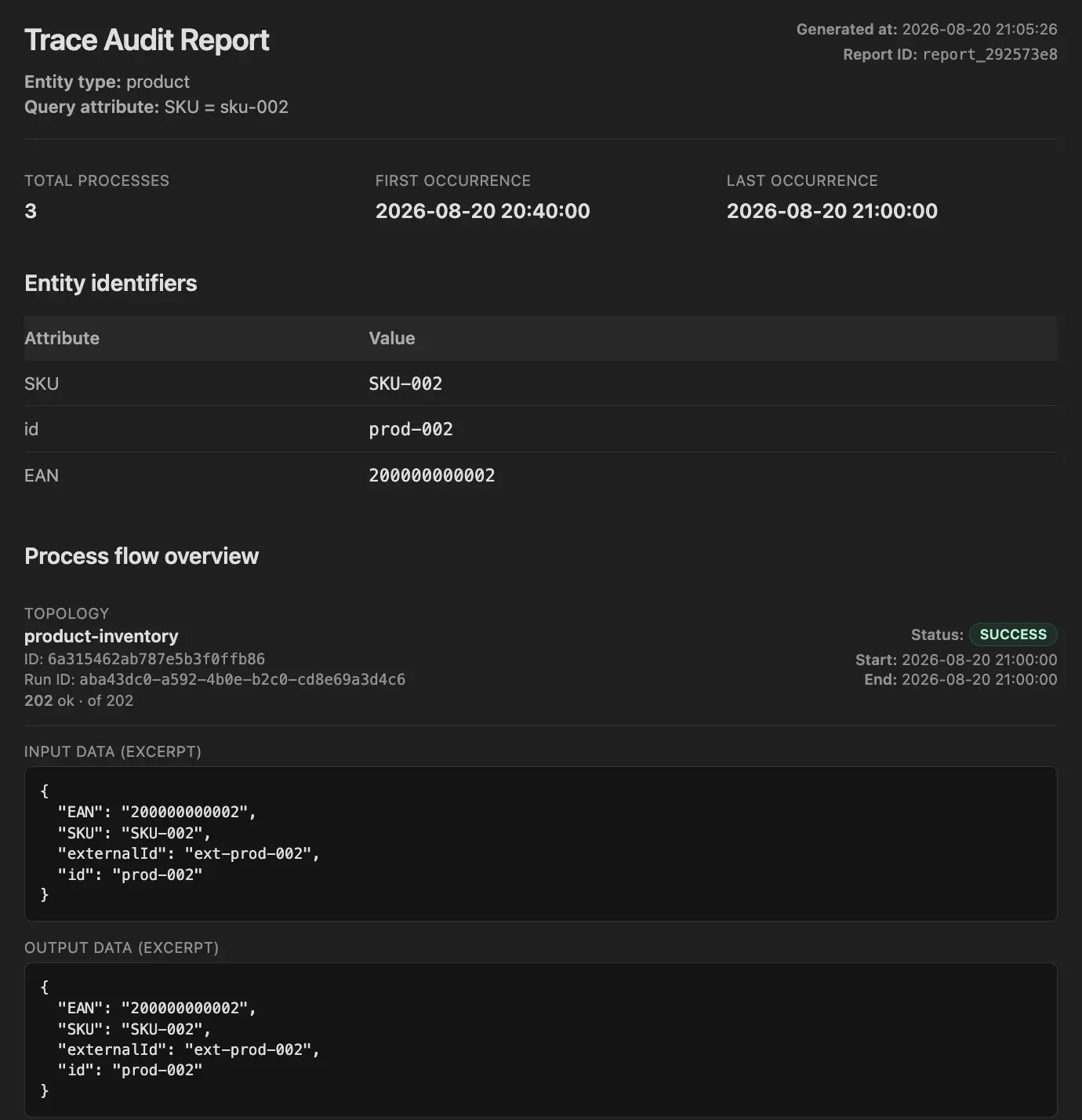
Trace reconstructs the history of a business entity across the integration layer instead of requiring operators to inspect individual processes separately.
This makes it possible to investigate data flows using identifiers that are meaningful to the person asking the question — an order number, SKU, EAN, invoice ID, email address, or another identifier defined for the entity.
What an entity audit can tell you #
Depending on how the integration is instrumented, an entity audit can show:
- which processes handled the entity,
- which topologies were involved,
- when each transfer happened,
- which systems formed the boundaries of the transfer,
- the delivery status at those boundaries,
- what selected data looked like at important points,
- and where the entity stopped, failed, repeated, or changed.
The result is not another generic log search. It is a timeline organized around the business object you are investigating.
How Trace works #
Trace builds entity audits using two independent mechanisms:
- Entity tagging connects processes and messages to a business entity.
- Audit checkpoints capture selected data and operational status at meaningful points.
You can use entity tagging without capturing detailed payload snapshots. Checkpoints are added only where the additional audit information is useful.
Layer 1: Entity tagging #
Before Orchesty can answer "what happened to this product?", it needs to know what represents a product and how products can be identified.
Entities are therefore defined explicitly.
For example:
Product

Searchable attributes:
- id
- sku
- ean
Or:
Order

Searchable attributes:
- id
- orderNumber
- externalId
When an integration knows the identity of the entity it is processing, it adds the corresponding audit metadata to the message.
From that point, Orchesty can associate the process with that entity.
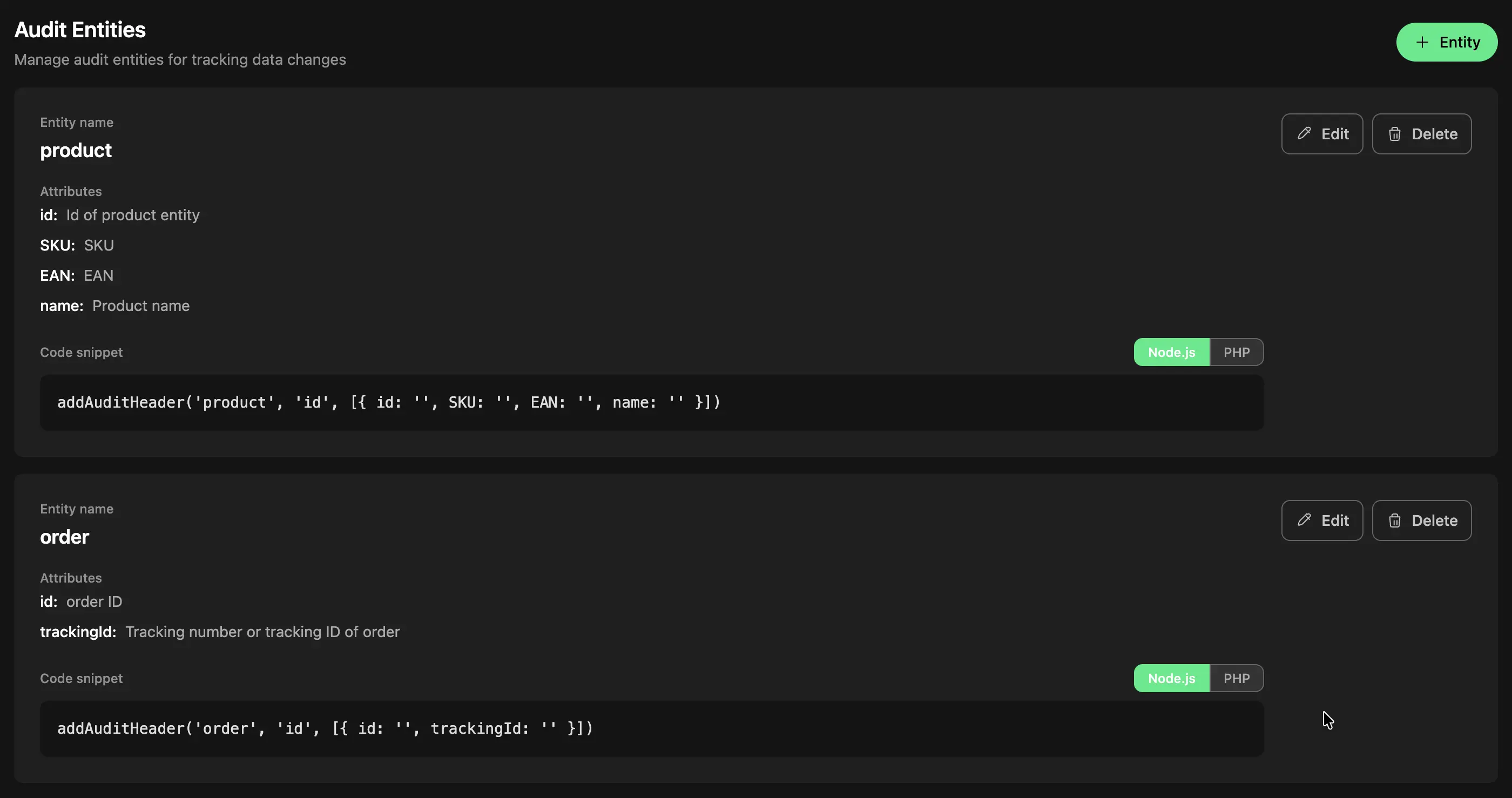
Define the entity and the identifiers operators may use to find it later.
You do not need one universal identifier #
Real integrations rarely use the same identifier everywhere.
An e-commerce platform may identify a product using its internal ID. An ERP may use a SKU. A warehouse may use an EAN.
Trace allows multiple attributes to identify the same entity.
This means support does not need to know the particular identifier used by one integration flow before starting an investigation.
If the user knows the EAN, they can search by EAN.
If they know the SKU, they can search by SKU.
The important part is that the relevant identifiers have been associated with the audited entity as it moves through the integration layer.
The searched attribute does not have to be present in every payload #
This distinction becomes important in real integrations.
Imagine a product that participates in several flows:
Catalog sync
Product ID + SKU + EAN + name + description

Price sync
Product ID + price

Stock sync
SKU + quantity
A user may report a problem using the EAN.
The price synchronization payload itself may never contain an EAN, but it still represents the same product.
Because Trace works with entity identity rather than simply searching raw payload text, related transfers can still be part of the same entity history when they have been correlated through the entity metadata.
This is one of the main differences between entity auditing and searching logs for a value.
Layer 2: Audit checkpoints #
Entity tagging tells Trace:
This process handled this entity.
Audit checkpoints answer:
What did the entity look like at this point, and what happened at the boundary?
A checkpoint captures selected audit information when a message passes a particular point in the flow.
Typical checkpoints include:
- data entering the integration,
- data after an important transformation,
- data leaving for an external system,
- or another business-significant stage.
A checkpoint can have one of three roles:
process_entry
process_step
process_exit
For each checkpoint, you explicitly define which fields may be captured.
That allows the audit to preserve the information needed for troubleshooting without treating the entire message payload as audit data.
Capture only the data you need #
Audit checkpoints use an allowlist.
For a product synchronization, for example, you might decide that troubleshooting only requires:
id
sku
price
currency
updatedAt
There may be dozens of additional fields in the payload, but they do not need to become part of the audit.
This is important for both operational efficiency and privacy.
An entity audit should answer the questions your team realistically expects to investigate — not become an uncontrolled copy of every payload moving through the platform.
Delivery status matters #
Capturing the data before an API call is useful, but it does not tell you whether the receiving system actually accepted it.
For boundary checkpoints, Trace also records the operational result of the transfer.
Statuses can distinguish outcomes such as:
Delivered
Failed
Repeating
Limit
Trashed
Unknown
This means the audit can show not only:
We attempted to send this version of the product.
but also:
The receiving system accepted it.
or:
The receiving system rejected it.
This makes the audit useful in situations where the question is not only what Orchesty processed, but what reached another system.
Put boundary checkpoints on the boundary #
There is one important modeling rule.
If a checkpoint is meant to tell you whether data was successfully delivered to another system, put it on the connector that actually performs that call.
Consider:
Mapper → Audit node → ERP Connector
If the audit checkpoint is placed on a passthrough node before the connector, that node can complete successfully even when the ERP rejects the following request.
The audit would therefore appear successful even though the business operation failed.
For boundary auditing, prefer:
Mapper → ERP Connector + audit checkpoint
The checkpoint can then reflect the actual outcome of the external call.
Use standalone or passthrough checkpoints mainly for internal process_step markers such as:
Order validated
Inventory reserved
Product normalized
where there is no external delivery result to report.
A practical example: investigating a product inconsistency #
Consider a product that flows through three integrations:
E-commerce
    ↓
Catalog synchronization
    ↓
ERP

ERP
    ↓
Price synchronization
    ↓
E-commerce

ERP
    ↓
Stock synchronization
    ↓
Warehouse / e-commerce
A user reports:
Product EAN 8591234567890 has the wrong price in the e-commerce platform.
Nothing appears in the error dashboards. All processes completed successfully.
Without entity auditing, the investigation may require:
- finding which topology synchronizes prices,
- identifying the relevant process window,
- finding the correct process,
- checking the incoming product ID,
- looking at the transformation,
- finding the outgoing API call,
- and comparing it with related catalog processes.
With Trace, the investigation starts with:
Product
EAN: 8591234567890
The resulting entity history can show the related processes and the data captured at their audit checkpoints.
You can then answer questions such as:
- What price came from the source?
- Was it transformed?
- What value was sent downstream?
- Was the downstream call delivered successfully?
- Did another process later overwrite the value?
- Was the inconsistency already present at the source?
The important difference is that there does not need to be a technical error for the investigation to work.
Ask Trace in natural language #
Trace is also available through an in-app conversational interface backed by an LLM.
Instead of navigating the underlying operational records manually, an operator can ask questions such as:
What happened to invoice 8841 yesterday?

Show me the transfers for product EAN 8591234567890.
Trace can also answer general operational questions — for example about recent failures, process volumes, or failing connectors.
For a broader overview of that workflow, see Observability in practice.
The distinctive role of this guide is the entity-level audit behind those questions.
Designing an audit model #
You do not need to audit every entity or add checkpoints to every node.
A useful audit model starts with the questions your support and operations teams actually receive.
For each important entity, ask:
1. How will people search for it? #
Define the identifiers they are likely to know.
For a product:
id
sku
ean
For an order:
id
orderNumber
externalId
2. Where does its identity first become known? #
Apply the entity metadata as early as practical so that subsequent processes can be associated with the same business object.
3. Which boundaries matter? #
Usually these are the places where the entity enters from or leaves for another system.
These are good candidates for process_entry and process_exit checkpoints.
4. Which transformations are worth recording? #
Add process_step checkpoints only where they answer a real future question.
For example:
Input from ERP
↓
Normalize product
↓
Apply pricing rules   ← useful checkpoint
↓
Map target payload
↓
Send to e-commerce
If the pricing rules are a common source of support questions, capturing the state immediately after them may be valuable.
Adding checkpoints after every trivial mapping step usually is not.
Granularity and high-volume integrations #
Every checkpoint creates additional audit data.
At low or moderate volume this may be negligible, but the design matters when topologies process millions of messages.
Imagine a batch synchronization containing one million products.
Adding a detailed checkpoint after the batch has been split into individual messages could produce one million audit records per run.
That may be unnecessary.
Prefer one of three approaches depending on what you actually need:
Audit before fan-out #
If the batch-level information is sufficient, place the checkpoint before individual records are emitted.
Use a marker without payload data #
Sometimes you only need to know:
This entity reached this stage.
In that case, capture the event without storing additional business fields.
Rely on entity tagging #
Not every stage needs a snapshot.
Entity tagging can still associate processes with the entity even when no detailed checkpoint is captured at that point.
The goal is not maximum logging.
The goal is enough audit context to answer real operational questions efficiently.
Retention #
Entity audits are built from operational records and are therefore bounded by the retention configured for the Orchesty environment.
Trace is not intended to create an unlimited multi-year archive of every data transfer automatically.
Choose retention based on the actual investigation horizon your organization needs.
For example:
- How long after an order is processed do support questions usually arrive?
- How far back do you need to investigate synchronization discrepancies?
- Which audit information must be retained elsewhere for regulatory purposes?
If long-term regulatory archival is required, that requirement should be designed separately from operational observability.
Security and privacy #
Entity auditing should never become an accidental copy of sensitive application data.
Trace therefore follows an explicit capture model.
Explicit field selection #
Audit checkpoints capture only fields that have been intentionally selected.
Avoid capturing complete bodies when a few operationally useful fields are sufficient.
No wildcard capture #
Fields should be reviewed individually rather than automatically including everything in the payload.
Sensitive values #
Credentials, authorization information, tokens, cookies, and similar technical secrets should never become part of the entity audit.
Additional masking provides protection if sensitive-looking fields are accidentally included.
Marker mode for sensitive entities #
For highly sensitive flows, an audit checkpoint does not need to contain the business payload at all.
It may be enough to record:
This entity passed this boundary and was successfully delivered.
If the raw identifier itself should not be stored, a derived value such as a hash can be prepared by the integration code and used instead.
The right audit design balances troubleshooting value against the sensitivity of the processed data.
Trace complements observability — it does not replace it #
Operational dashboards and entity auditing solve different parts of the same problem.
Dashboards typically move from infrastructure toward detail:
TIME
  ↓
TOPOLOGY
  ↓
PROCESS
  ↓
CONNECTOR
  ↓
MESSAGE
Trace can start from the opposite direction:
BUSINESS ENTITY
  ↓
RELATED PROCESSES
  ↓
AUDIT CHECKPOINTS
  ↓
DATA HISTORY
Both views use the same integration runtime.
Which one you choose depends on the question you are trying to answer.
"Why are integrations failing right now?"
Start with operational dashboards.
"What happened to this particular order?"
Start with Trace.
Availability #
Trace is an advanced Orchesty auditing capability and is generally available.
It is included out of the box in Enterprise Edition and Pro Level 3, and available as a paid add-on for Pro Level 1 and Level 2. It is not part of the Starter plan or Community Edition, which still record every process but without the per-entity report and boundary-aware delivery status.
For current plan availability, see Pricing or contact the Orchesty team.
The underlying processes and operational records remain part of Orchesty independently of Trace; Trace adds the entity-centric correlation and auditing layer described in this guide.
Where to go next #
- Observability in practice — see how process heatmaps, connector statistics, failed messages, rate-limit monitoring, and Trace work together during day-to-day integration operations.
- Operations: Trace auditing — configure entities, audit metadata, and checkpoints in your Orchesty environment.
- Operational visibility — understand the overall observability model of Orchesty.
- Concepts: Processes and messages — learn about the runtime records Trace builds on.
Want to see it in your own environment?