POS Integration — Orchestrating Retail Across Stores and Central Systems
How Orchesty connects central POS platforms with ERP, inventory, pricing, loyalty, e-commerce, and analytics systems while keeping high-volume retail data flows reliable and observable.
In a retail chain, the point-of-sale system sits at the intersection of products, prices, customers, inventory, payments, orders, and financial data.
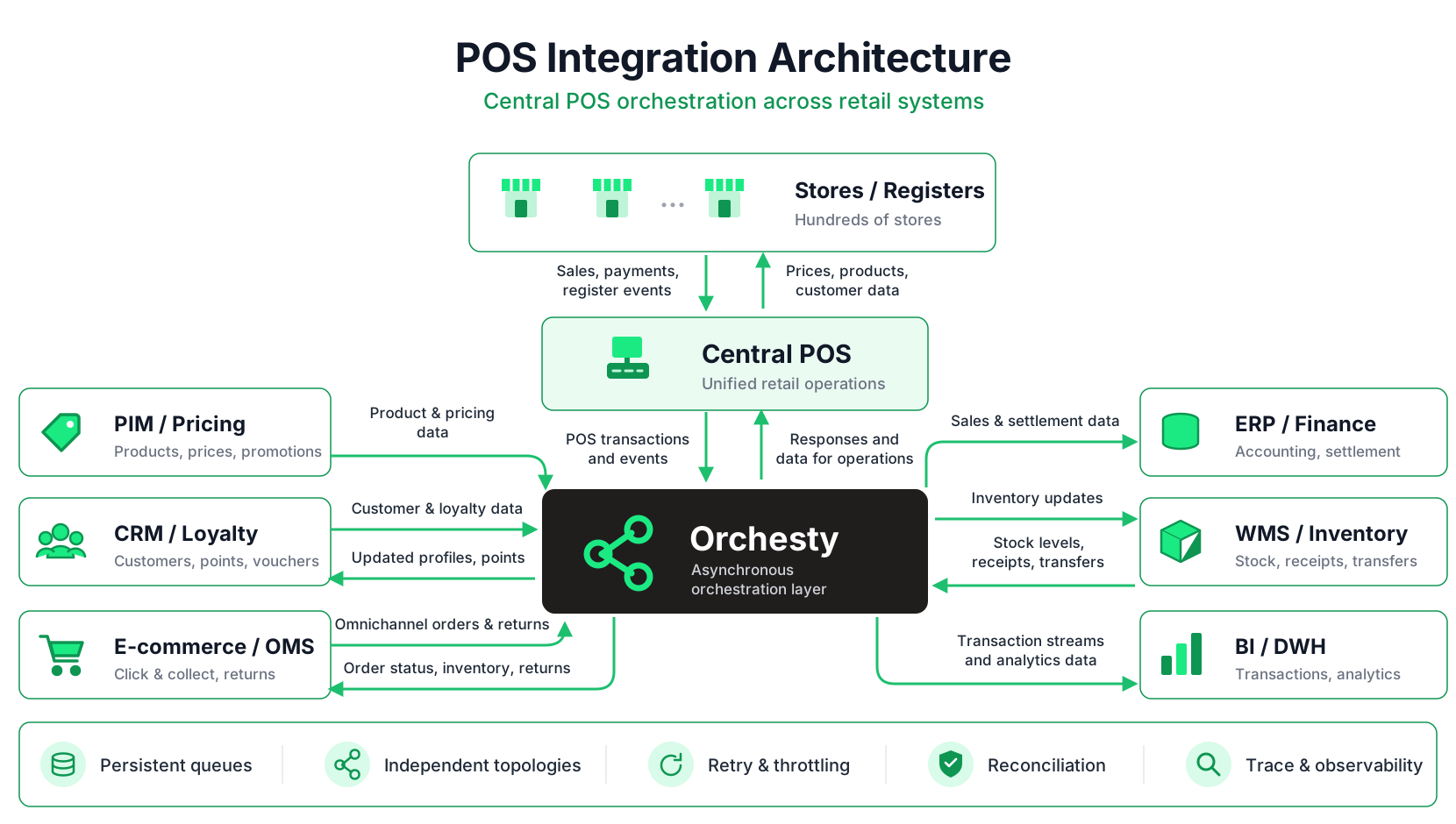
The central POS environment exchanges data with ERP, PIM, pricing, WMS, CRM, loyalty, OMS, e-commerce, finance, and analytics platforms — often at very different speeds, volumes, and reliability requirements.
Orchesty provides the orchestration layer between these systems, making individual data flows independently scalable, resilient, and observable.
1. The Shape of a Modern POS Integration #
A typical retail architecture contains several independent data streams.
Towards the POS environment:
- Products and master data: SKU, EAN, variants, tax categories, units, descriptions.
- Prices: standard prices, regional pricing, store-specific prices, customer price levels.
- Promotions: discounts, coupons, bundles, campaign validity.
- Customer and loyalty data: customer identity, loyalty status, benefits, points, vouchers.
- Inventory and supply data: deliveries, transfers, reservations, availability.
- Omnichannel orders: click & collect, store pickup, reservations.
From the POS environment:
- Sales transactions: receipts, line items, discounts, taxes, and payment methods.
- Returns and cancellations.
- Inventory movements caused by store activity.
- Loyalty transactions and customer purchase history.
- Store and cashier closing data.
- Accounting and settlement data.
- Detailed transaction streams for BI and analytics.
Different systems can remain responsible for their own business domains. ERP can own accounting and product master data, WMS inventory, CRM customers, and a dedicated pricing platform prices and promotions. Orchesty connects these domains and orchestrates the flows between them and the POS environment.
This makes POS integration fundamentally an orchestration problem between multiple systems of record.
2. Separate Topologies for Separate Responsibilities #
A retail integration can be divided into independent topologies according to individual business responsibilities. For example:
- PIM → Product Mapping → Central POS
- Pricing → Price Validation → Central POS
- Central POS → Sales Processing → ERP
- Central POS → Inventory Movement → WMS
- Central POS → Loyalty Event → CRM
- Central POS → Transaction Stream → Data Platform
- E-commerce / OMS ↔ Store Order Flow ↔ Central POS
This separation is important operationally.
A temporary outage of the loyalty platform should not prevent sales data from reaching the ERP. A large product synchronization should not delay financial transactions. A spike in e-commerce pickup orders should not block price updates.
Each data stream can have its own queues, retry policy, throughput, rate limits, and monitoring while remaining part of one observable integration environment.
3. Distributing Products, Prices and Promotions at Scale #
One of the most demanding POS workflows is the distribution of master data.
A retail chain may maintain hundreds of thousands of products, multiple price lists, regional differences, customer price levels, and temporary promotions.
Orchesty can process these streams as delta synchronizations:
- Products or prices are read from their system of record.
- The payload is normalized into the structure expected by the POS.
- A Comparator can eliminate records whose relevant data has not changed.
- Only the resulting delta continues to the POS connector.
- Rate limits control how quickly the target system receives the updates.
If the source supports lastUpdated filtering, only changed records need to be requested in the first place. If it does not, the same topology can compare the incoming dataset and prevent unchanged records from creating downstream traffic.
This becomes especially important around large campaign launches or mass price changes, where thousands or millions of updates may arrive within a short period.
Orchesty's persistent queues absorb the burst and allow the target system to process it at a sustainable rate.
4. Sales Transactions: One Event, Multiple Destinations #
A completed sale can be relevant to several systems at once.
- The accounting system may require aggregated financial information.
- The WMS or ERP may need inventory movements.
- The loyalty platform needs information about the customer's purchase.
- The analytics platform may require every receipt and every line item.
Orchesty can route the transaction into the processes that need it:
POS Sale → ERP / Accounting → Inventory → Loyalty → Data Platform
The representation can be different for each destination. A BI platform may receive the complete receipt with all line items, while the accounting integration can aggregate transactions by store, tax rate, payment method, or accounting period.
This keeps the POS integration independent from how individual downstream systems model the same business event.
5. Reliable Processing Across the Retail Environment #
Retail integrations need to remain reliable even when individual systems are temporarily unavailable.
An ERP can be unavailable for maintenance. A loyalty service can time out. A reporting platform can be temporarily unreachable. A network connection between systems can fail.
Orchesty decouples these systems through persistent asynchronous queues.
If the ERP becomes unavailable, sales messages remain queued and processing continues when the system returns. A transient error can be retried automatically. A message that repeatedly fails because of invalid business data can be isolated for investigation without stopping unrelated transactions.
Each business flow can continue independently while failed or delayed processing remains visible and recoverable.
6. Omnichannel: Connecting Online and In-Store Processes #
Physical and online retail increasingly share the same fulfillment processes.
A typical click-and-collect flow may look like:
E-commerce → OMS → Orchesty → Central POS / Store
The store receives the order or reservation and prepares it for pickup. After collection:
POS → Orchesty → OMS → E-commerce / ERP / Loyalty
A return can travel in the opposite direction:
Store POS → OMS → ERP → Payment / E-commerce
These are multi-step business processes spanning systems with different ownership and different failure modes.
Orchesty keeps the orchestration outside those systems while preserving the state of each individual process.
7. Reconciliation: Finding What Did Not Arrive #
In a retail network, successful API calls are only one part of reliable integration. Operations needs to answer questions such as:
- Did every store receive today's price update?
- Was receipt 4587291 transferred to the ERP?
- Why does inventory in the POS differ from the WMS?
- Did a returned order reach both finance and the OMS?
- Which transactions are still waiting because the ERP was offline?
- Which stores or systems are producing repeated errors?
For critical flows, event-driven delivery can be complemented by reconciliation processes.
A scheduled topology can compare expected and actual state, detect missing or inconsistent records, and create only the delta that needs to be repaired.
This turns reconciliation into part of the integration architecture rather than a manual incident procedure.
8. Observability Across Hundreds of Stores #
The larger the retail network becomes, the more important it is to understand the state of individual business entities.
Orchesty provides visibility into individual processes and messages, including the data that entered the topology, individual processing steps, external system responses, retries, and failed messages.
With Trace (Pro & Enterprise), the investigation can start from the business entity itself — for example a transaction, product, order, or customer — and follow it across multiple topologies.
That makes questions such as "What happened to transaction 4587291 from Store 143?" much easier to answer than searching separate logs from the POS, ERP, WMS, and integration scripts.
The integration layer becomes the common audit trail between systems without becoming the owner of their business data.
Summary of Results #
- Decoupled architecture: POS, ERP, WMS, CRM, e-commerce, and analytics systems can operate independently.
- Scalable distribution: large product, price, and promotion updates can be buffered, filtered, and rate-limited.
- Reliable transaction delivery: sales events remain available for processing even when downstream systems are temporarily unavailable.
- Independent workflows: product sync, sales, inventory, loyalty, and omnichannel orders can scale and fail independently.
- Built-in recovery: failed messages can be retried, inspected, and recovered without replaying an entire integration.
- End-to-end observability: individual transactions, products, or orders can be traced across the integration landscape.
- Clean system ownership: ERP, PIM, WMS, CRM, and POS remain systems of record; Orchesty provides the orchestration between them.
Related #
- E-commerce & ERP integration — synchronization of products, prices, stock, and orders at scale.
- Logistics integration — orchestration of fulfillment across e-commerce, ERP, WMS, and carriers.
- High-volume catalog reconciliation — using the Comparator pattern to reduce large datasets to the actual delta.
- Operational visibility — monitoring queues, failures, and rate-limited applications.
- Trace auditing — following individual business entities across multiple topologies (Pro & Enterprise).